
Independent review ? Updated September 2026
Builderall Review 2026: Features, Pricing, Pros & Cons
Managing separate tools for your website, email marketing, bookings and sales pages can mean more subscriptions, more logins and more setup work. Builderall aims to bring these functions together in one account.
Is that convenience worth the cost, learning curve and plan limits? This review examines Builderall's features, pricing, strengths, and drawbacks to help you decide whether it fits how you want to run your business.
Affiliate disclosure: This review contains affiliate links. If you purchase Builderall through one of these links, I may receive a commission at no extra cost to you. This does not affect the price you pay or the conclusions in this review.
Quick verdict
Verdict: BUY - for the right all-in-one user
Builderall is a strong-value option for solopreneurs, affiliate marketers, course creators, and small businesses that genuinely want multiple marketing functions under a single login. Its breadth is the attraction, but also the compromise: the platform takes time to learn, lower plans have meaningful limits, and specialist tools may feel more refined in their strongest area. The Essentials plan is the most sensible starting point for many marketers because it adds email marketing, ecommerce and higher website limits.
Editorial rating: 4.0/5 ????? - based on breadth, value, ease of use, plan limitations and the quality of the connected toolset.
Best for: People who will use at least three or four connected tools and prefer one subscription over a collection of separate services.
Main drawback: The broad platform has a learning curve, and individual apps may not match the depth of leading specialist products.
Think twice if you want the simplest possible single-purpose tool, need best-in-class depth in a single specialist function, or do not want to spend time learning a broad platform.
How This Review Was Prepared
This review combines firsthand use with current research sources. ReviewsCheckHere is built and hosted in Builderall, and Shaun has used the platform for the website, domain connection, professional email and ongoing blog publishing. Those experiences support the practical observations about the back office, website workflow and the advantages and frustrations of keeping several functions in one system.
I checked the pricing, plan limits, tool descriptions, guarantee, and company information against Builderall's official offer, tools, and checkout pages, using independent review platforms for additional context. This is not a claim that I personally tested every Builderall application or optional add-on. Confirm time-sensitive details on the live checkout before purchasing.
Check the Current Builderall Offer ?
Builderall at a glance
Product: Builderall Marketing Suite.
Company and founder: Cloud Builder LLC; Erick Salgado founded Builderall.
Category: An all-in-one platform for building websites and managing digital marketing.
Published plans: Core, Essentials, Advanced and Premium, as listed in Builderall's June 2026 pricing guide.
Advertised offer: The promotional page displayed "Get everything for $47/mo" during our check on 22 September 2026. Confirm the included plan, tools, usage limits and renewal price before purchasing.
Pricing note: USD is our reference currency. The final checkout amount can vary by country, currency, taxes, billing period, and promotion.
Refund guarantee: Builderall's June 2026 pricing guide advertises a 30-day money-back guarantee. Check the terms, eligibility and exclusions that apply to your chosen offer.
????????????????????????????????????????????
Overall assessment: Builderall offers good value when it replaces multiple subscriptions. Its appeal is weaker if you only need one function.
What is Builderall?
Builderall is a hosted marketing suite for building websites and landing pages, collecting leads, and managing online marketing, all from one account. Across the platform, its tools cover email campaigns, product and course sales, webinars, contact management and automated follow-up. The tools and usage limits available to you depend on your chosen plan. Builderall advertises more than 25 tools and markets the platform to agencies, small businesses, course creators, freelancers, startups and health-and-wellness businesses.
The company's public footer identifies Cloud Builder LLC as the current trademark owner. Builderall's wider company history identifies Brazilian entrepreneur Erick Salgado as the founder. The commercial idea is straightforward: replace several separate subscriptions and reduce the connecting, logging in, and data moving required between tools.
How Builderall works
You choose a plan, connect an existing domain or register one, and access the included tools from a single back office. A typical workflow might start with a website or landing page, capture a lead through a form connected to a MailingBoss list, and use a configured email sequence to guide that person towards a booking, webinar, course or checkout. CRM tools can help organise contacts and follow-up. You need to set up and test these connections: the form captures contact details, while a separate sequence or automation handles subsequent campaign emails.
That connected workflow is Builderall's biggest practical benefit. The value doesn't come from a long menu of tools; it comes from using several of them together. If you only need a basic website, a dedicated website builder could be easier. If you need a website, email automation, lead capture, appointment scheduling, and digital product delivery, Builderall becomes even more compelling.
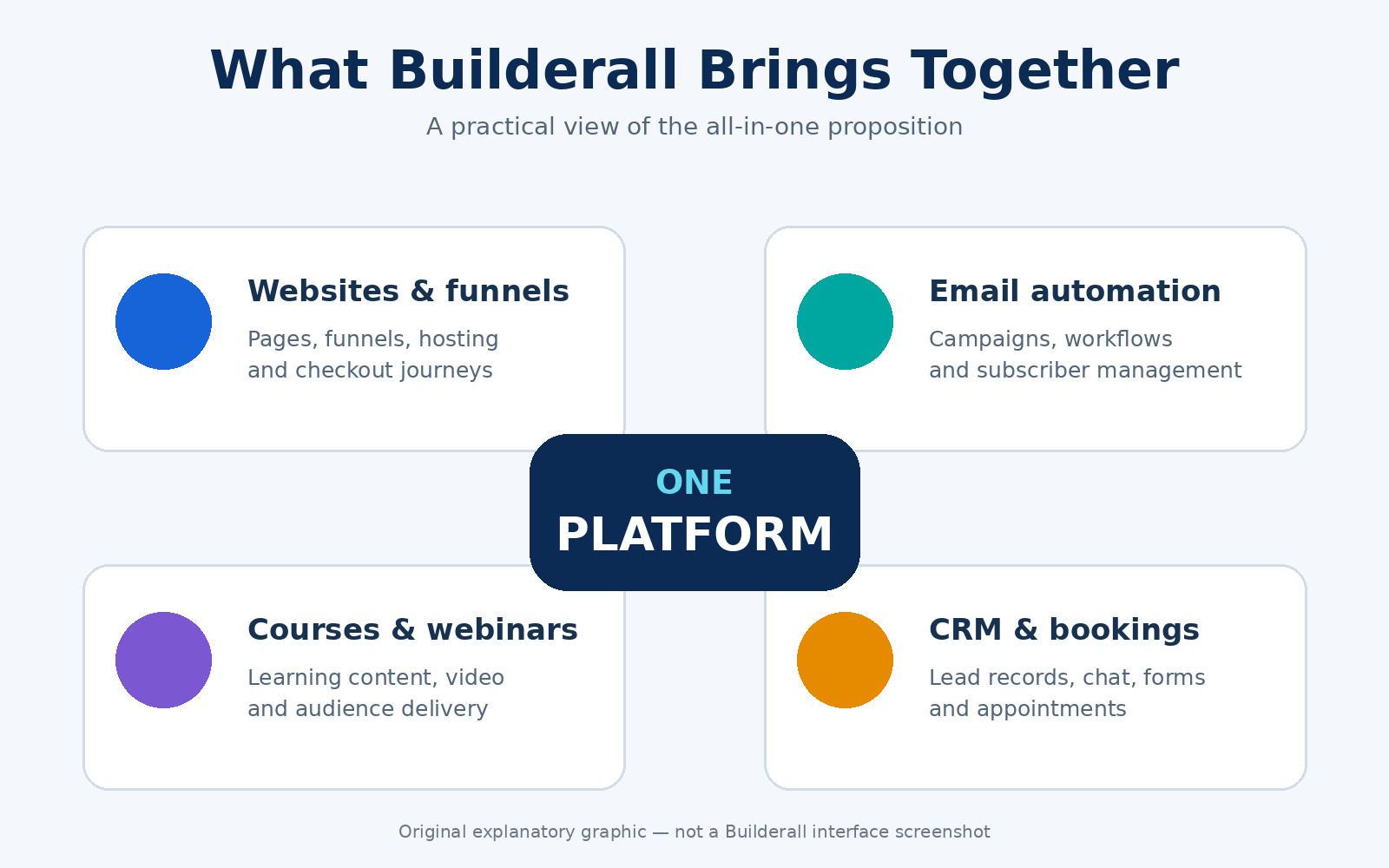
Original explanatory graphic ? not a Builderall interface screenshot.
Main Builderall features
Availability and usage limits vary by plan and offer. Check that your chosen subscription includes the tools you intend to use.
Website and landing page builder: Create responsive websites, landing pages and sales pages using templates and a visual editor. This can simplify getting an offer online without coding. Hosting is included in Builderall's published paid plans; website limits vary.
Funnels, forms and checkout: Connect lead-capture pages, forms and checkout steps to guide visitors from initial interest to an enquiry or purchase. Builderall supports physical and digital products, but access to ecommerce tools depends on the plan.
MailingBoss email marketing: Manage subscriber lists, broadcasts and automated sequences to follow up after someone signs up. Confirm that email marketing is included, then check both subscriber limits and monthly sending allowances against your needs.
CRM, chat and appointments: Organise contact information, answer enquiries using live chat or website chatbots, and let prospects book appointments. These tools can help keep conversations and next steps within the same platform.
Courses, webinars and video: Create course content, host videos and run webinars using Builderall's listed tools. This may reduce the need for separate subscriptions if the included features and limits suit your teaching or presentation needs.
Social and conversion tools: Builderall lists browser notifications, social-proof and exit-intent pop-ups, comment autoresponders and Messenger/Instagram chatbots. Several conversion tools are also advertised in its free Supercharge Bundle, so check that bundle's limits when judging the value of a paid subscription.
WordPress and WooCommerce options: Builderall lists WordPress and WooCommerce tools and documents connections with MailingBoss. These may suit an existing WordPress business; confirm the integration requirements, hosting arrangements and any separate costs for your intended setup.
AI credits, domain and professional email: Builderall's June 2026 pricing guide lists AI credits, storage and professional mailboxes across its four published paid tiers, plus a free domain for the first year. Confirm the current allowances, domain eligibility and renewal cost. A professional mailbox is separate from MailingBoss email marketing.
The benefits in real business terms
- Fewer subscriptions to manage: Builderall can simplify your software bills if its tools replace services you already pay for, such as hosting, email marketing, bookings or course delivery. Savings depend on which paid services you replace.
- Less integration work: Connections between Builderall's tools can reduce the number of external services you need to link together. Forms, lists, checkout actions and follow-up emails still need to be configured and tested.
- Room to grow: Published plans offer different allowances for websites, storage, email sending, subscribers, AI credits and team members. This gives you options as your needs change, but an upgrade does not increase every allowance.
- More ways to test an idea: You can experiment with a lead magnet, booking page, funnel, course or webinar using the tools included in your plan. This can make small experiments easier to budget for, although setup time and any extra costs still matter.
- Simpler management of the basics: Keeping website hosting and professional email with a single provider can reduce routine administrative work. When comparing overall value, check first-year domain offers, renewal costs, and the usefulness of bundled extras.
Pros and cons
? Pros
- Broad, connected toolset: Website building, lead capture, email marketing and other business functions are available within one platform, depending on your plan.
- Potential savings through consolidation: Builderall can offer good value by replacing several subscriptions you already need. Savings depend on which services you can replace.
- Useful functions from Essentials: Essentials includes email marketing and e-commerce, making it more suitable than Core for building a mailing list and selling online.
- Hosting and professional email together: Published paid plans combine these business basics, reducing the number of services you need to manage.
- Advertised refund window: Builderall advertises a 30-day money-back guarantee for eligible subscriptions. Check the terms, including payment method and purchase exclusions, before relying on it.
× Cons
- A learning curve: Learning the back office and configuring several connected tools takes time, particularly if you are starting from scratch.
- Core has significant restrictions: Builderall's June 2026 pricing guide lists one published website and excludes email marketing and ecommerce. A professional mailbox does not replace an email marketing service.
- Specialist requirements need closer examination: Individual apps may not provide the depth or workflow you need, as a dedicated product would. Compare your essential functions before committing.
- Official information can differ: Builderall's published pages contain conflicting pricing or allowance details. Confirm the exact offer, renewal price and included limits before purchasing.
- Allowances and extras affect the total cost: Subscriber numbers, email sending, storage and optional add-ons can influence which plan you need and what you ultimately pay.
- Migration needs planning: Do not assume an existing website will import unchanged into Builderall's native editor. Check whether your site has a supported migration path or needs rebuilding; moving a WordPress site requires a separate process.
Builderall pricing and upgrades
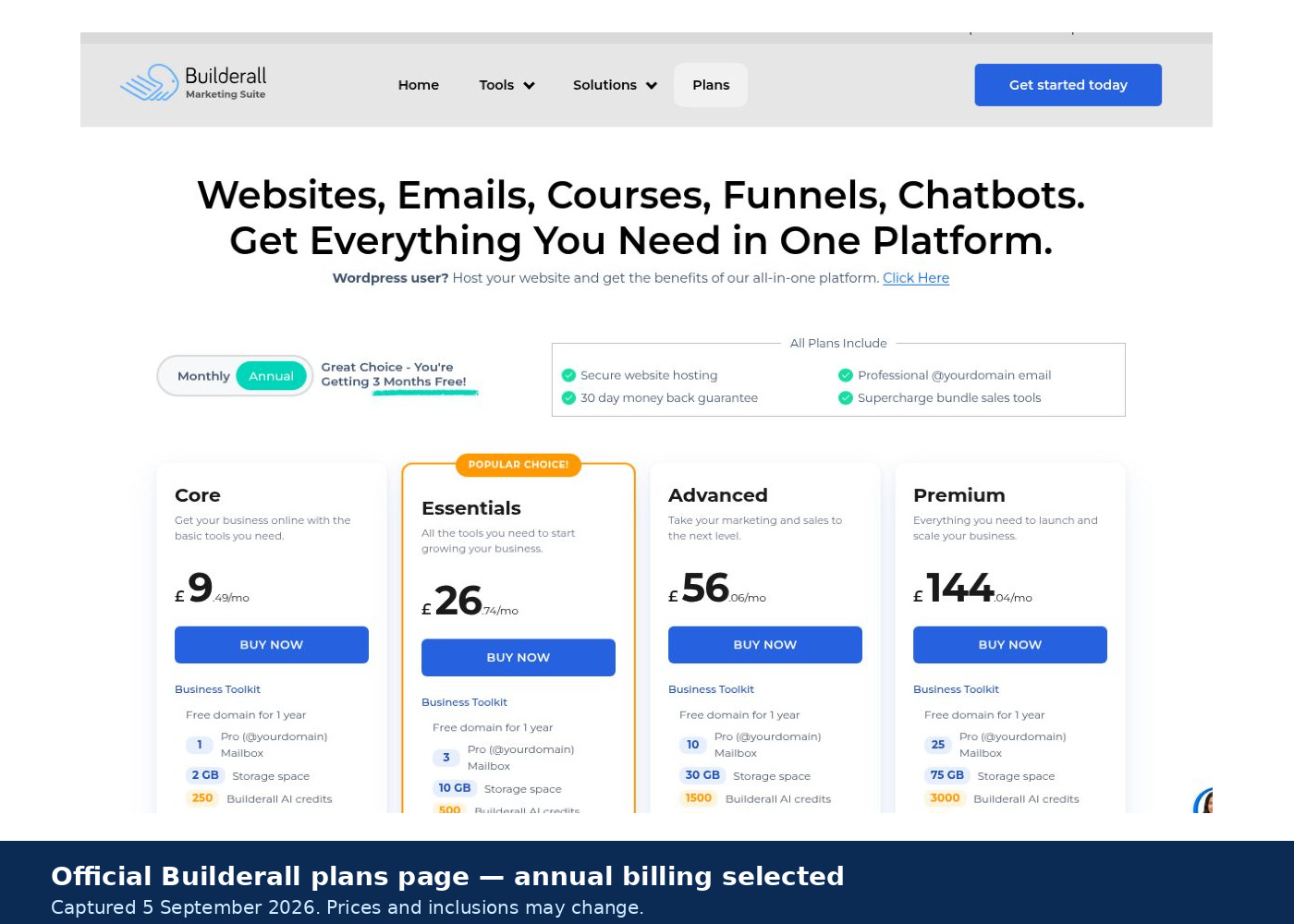
Builderall offers four paid plans: Core, Essentials, Advanced and Premium. We use USD as a reference for our global audience, but Builderall's checkout may display prices in your local currency. The final amount can vary based on your chosen plan, billing period, applicable taxes, and promotions.
?????????????????????????????????
Check whether Monthly or Annual billing is selected. A price displayed "per month" under Annual billing represents a monthly equivalent; check the full annual payment before ordering. Always confirm the amount due, renewal price, included tools and usage limits for your chosen offer.
Which Builderall plan should you consider?
Core: For getting a basic business website online with hosting and professional email. Consider a higher plan if you need email marketing or e-commerce.
Essentials: For businesses that want to build an email list and sell online using connected website, email marketing and e-commerce tools.
Advanced: For growing businesses that need higher email allowances and team member access.
?????????????????????????????
Premium: For larger email lists, higher sending volumes, more storage and larger teams. Advanced and Premium both list 25 published websites, so compare their other allowances when deciding whether to upgrade.
What changes between plans?
? Core: 1 published website, 1 professional mailbox, 2 GB storage and 250 AI credits.
? Essentials: 10 published websites, 3 mailboxes, 10 GB storage, 500 AI credits, e-commerce and email marketing with 60,000 sent emails per month and 3,000 subscribers.
? Advanced: 25 published websites, 10 mailboxes, 30 GB storage, 1,500 AI credits, 3 team accounts, 250,000 sent emails per month and 10,000 subscribers.
? Premium: 25 published websites, 25 mailboxes, 75 GB storage, 3,000 AI credits, 10 team accounts, 1 million sent emails per month and 100,000 subscribers.
Plan allowances checked: 24 September 2026. The figures above were checked against Builderall's standard plan comparison using checkout screenshots. Confirm the price, billing period, and limits associated with your selected offer before purchasing. Optional add-ons and usage above your plan's allowances may carry extra charges.
See Builderall Plans and Pricing ?
Is there a free trial or refund guarantee?
Free trial: Some official Builderall signup pages advertise a 14-day free trial. Check whether your chosen offer includes it, whether you need to enter a payment card, and when paid billing begins.
Refund guarantee: Builderall advertises a 30-day money-back guarantee, subject to eligibility and exclusions. Its published terms limit subscription refund requests to the first 30 days and generally allow one refund per account. Exclusions include domain purchases, SMS credits, cash payments and SEPA payments. Earning affiliate commission can also affect eligibility. Requests must go through Builderall support; check the full refund terms before purchasing.
Cancellation: Cancelling a subscription and obtaining a refund are separate processes. Check your renewal date and when cancellation takes effect, particularly with annual billing.
Free tools: Builderall separately offers the free Supercharge Bundle for existing websites, including social proof, browser notifications, live chat, exit pop-ups and comment autoresponders. Usage limits apply, and the bundle doesn't provide free access to the full paid platform.
Add-ons and upgrades
Builderall says optional add-ons are available and that accounts can be upgraded as a business grows. The public page doesn't provide a complete, fixed add-on price list, so don't quote an unverified upsell total. Before buying, check the live plan comparison for subscriber capacity, email volume, storage, team accounts, AI credit usage, and any paid communication features such as SMS or WhatsApp.
What about WordPress users?
Builderall also lists three WordPress plans: WP Essentials, WP Advanced and WP Premium.
If you intend to use WordPress, compare these offers and confirm which hosting, marketing tools, and how many WordPress installations are included. Check how the displayed website allowance applies to WordPress, what migration involves and whether any additional costs apply.
As with the main plans, check your checkout currency and billing period. Prices are displayed per month; when you select Annual, they represent monthly equivalents for annual billing.
What user reviews suggest
External review platforms provide a useful reality check, although individual reviews cannot predict every buyer's experience. As of 24 September 2026, Trustpilot showed a Builderall score of 4.2/5 from 103 reviews. Ratings and review counts can change.
Feedback on Capterra UK and G2 includes praise for the range of tools, value for money, and the convenience of managing several marketing functions in one place.
Critical reviews raise concerns about the learning curve, limitations within individual tools, technical problems and support. Some Trustpilot reviewers also describe billing or cancellation difficulties. These are reported customer experiences; we have not independently verified individual cases.
Read recent positive and negative reviews, paying attention to the reviewer's needs, the review date and any company response. Some feedback concerns older versions of the platform, and these relatively small samples may not represent the wider customer base. Use them alongside the current plan details and your own evaluation?not as a guarantee of results.
Who should buy Builderall?
Builderall is most appealing when you will actively use several connected tools. It is worth considering for
? Affiliate marketers: Those who need landing pages, lead capture and email follow-up, with simple digital-product sales where relevant.
? Coaches and course creators: Those who want websites, bookings, webinars, memberships and course delivery within one account.
? Small businesses: Those that could replace several separate website, email marketing, booking, chat or CRM subscriptions with tools they will actually use.
? Freelancers and small agencies: Those managing multiple websites whose requirements fit the selected plan's website, storage and team-access allowances.
? Beginners willing to learn: Those prepared to follow training, allow time for setup and testing, and build one campaign at a time.
Before subscribing, confirm that your chosen plan includes the specific tools and capacity you need. An all-in-one account doesn't mean every feature or allowance is included at every price.
Who should skip Builderall?
Builderall is less likely to suit:
? People who want the simplest possible website setup: If you only need a few information pages and a contact form, with no plans to use the marketing tools, a simpler website builder may be a better fit.
? Teams whose existing systems already work well together: Moving established websites, email campaigns, customer records and stores may create disruption without enough benefit or savings.
? Businesses with unmet specialist requirements: If particular email automation, CRM, reporting or ecommerce capabilities are essential, check them individually. Skip Builderall if your chosen plan cannot meet those needs.
? Buyers expecting a guaranteed one-click migration: Do not assume an existing third-party website will transfer unchanged. Confirm the supported migration route, what needs rebuilding, and any additional work before committing.
? People choosing mainly for the tool count: If you will use only one or two apps, compare the cost and suitability of those functions separately. A large bundle offers little extra value when most of it goes unused.
Builderall alternatives
The best alternative depends on the job you need the platform to do. Based on their published features and plans, these are useful options to compare:
Systeme.io: For funnels, email marketing and course delivery, particularly when starting on a limited budget. A free plan is available; check its contact, funnel, and course limits, plus upgrade costs.
ClickFunnels: For businesses prioritising sales funnels, checkout flows and conversion testing. It also offers email, courses, and other tools, so compare the full plan against your needs.
HighLevel: For agencies managing CRM, lead follow-up and separate client accounts. Its standard monthly pricing lists Starter at US$97 and Unlimited at US$297. Phone, SMS, email, and premium AI usage may incur extra charges.
Kajabi: For businesses built around courses, coaching, memberships, and communities, with website and email marketing tools included. Compare product and contact limits, subscription costs and payment fees.
Self-hosted WordPress + selected tools: For more control over hosting, design, and plugins. You will need to arrange hosting, security, backups and updates, plus suitable tools for forms, checkout and automation. Include any plugin renewals and integration work in your budget.
Pricing checked: 24 September 2026. The HighLevel figures above are advertised USD subscriptions billed monthly. Confirm current pricing, taxes, allowances and additional charges before purchasing.
Builderall's strongest case remains its ability to bring together several useful marketing functions. Compare the total cost, required features, and day-to-day workflow of each option before deciding which offers the best value for your business.
Final verdict
Verdict: BUY ? for the right all-in-one user
Builderall can offer good value when several of its tools support a business workflow you will actually use. Its appeal is bringing websites, lead capture, email follow-up, bookings, and other marketing functions together, potentially reducing the need for separate subscriptions and integration work.
For solo marketers who need website building, email marketing and ecommerce, Essentials is a sensible plan to compare first. Core may cover a basic website, while Advanced and Premium offer higher allowances and team access. Choose based on your needs, because upgrading doesn't increase every allowance.
Expect a learning curve and allow time for setup and testing. Consider reports of technical and support issues, and specialised tools may better meet specific requirements. Older reviews can still highlight useful questions; check whether their concerns apply to the current platform.
Before purchasing, confirm the checkout currency, billing period, total charge, renewal price and plan limits. Builderall advertises a 30-day money-back guarantee, but eligibility requirements and exclusions apply, so read the refund terms before paying.
If you buy, start with one defined workflow and test it promptly?from the visitor's first interaction through to the intended booking, purchase or follow-up. That practical fit should determine whether Builderall earns its place in your business.
Not sure which all-in-one platform is right for you?
Use our free Buyer's Checklist to compare the features, costs, limits and practical considerations that matter before choosing an all-in-one marketing platform.
Get the free checklist, and we'll send you a confirmation email. Once you confirm your email address, your checklist will be ready to download.
Get the Free Buyer's Checklist ?
Ready to check the current Builderall offer?
Compare the included tools and plan limits, then confirm your checkout currency, billing period, total payment and renewal price before purchasing.
View the Current Builderall Offer ?
Frequently asked questions
Is Builderall worth it?
Builderall can offer good value when a suitable plan replaces several tools you need. If you only need one function, compare its cost, capabilities, and learning curve with those of a more focused product.
How much does Builderall cost?
Builderall lists Core, Essentials, Advanced and Premium, plus separate WordPress plans. Prices depend on the plan, currency, billing period and offer. Check the total payment and renewal price at checkout. A monthly figure displayed with Annual billing selected represents the monthly equivalent of the annual subscription.
Does Builderall have a free trial?
Some official Builderall offers advertise a 14-day free trial. Check whether your chosen offer includes it, whether you need to provide a payment card, and when paid billing begins.
The advertised 30-day money-back guarantee is a separate refund arrangement with conditions. Builderall also offers the free Supercharge bundle for selected functions on existing websites; this does not provide full access to the paid platform.
Is Builderall suitable for beginners?
It can suit beginners who are prepared to follow training and allow time to set up. Start with one website or landing page and one clear goal. If your plan includes email marketing, configure and test the lead-capture and follow-up process before expanding.
Can Builderall replace ClickFunnels?
It may, if your chosen Builderall plan covers the pages, checkout, automation and integrations you need. Both platforms combine funnels with other marketing tools. Compare your actual workflow, usage limits and total costs before switching.
Can I move my existing website into Builderall?
The process depends on how your website was built and which Builderall tools you intend to use. You may need to rebuild pages in the native website builder.
Builderall separately offers WordPress plans and publishes WordPress migration guidance. Confirm current compatibility, installation limits, available migration help and any charges before moving. Keep a backup of your existing website.
Can I cancel Builderall at any time?
You can cancel a subscription, but check the cancellation process, the renewal deadline, and when the cancellation takes effect. Cancelling renewal and obtaining a refund are separate matters.
The advertised 30-day money-back guarantee has eligibility requirements and exclusions. Do not assume that cancelling an annual subscription will automatically refund unused months.
Are there extra costs?
Optional add-ons and usage above your plan's allowances may increase the total cost. Check subscriber capacity, email sends, storage, AI credits and any paid SMS or WhatsApp services you intend to use. Also confirm domain renewal costs after any included first year.
Sources and fact-check notes
Product and features: Builderall's official website and tool catalogue ? product descriptions, available tools and vendor marketing claims.
Plans and allowances: Official plan comparison and Builderall's June 2026 pricing guide ? published plan details. We also compared allowances with checkout screenshots on 24 September 2026. Confirm the details attached to your selected offer.
Trials and free tools: Official trial offer and Supercharge Bundle ? advertised trial availability and the separate free-tool offering.
Refunds and cancellation: Builderall's terms of use ? refund eligibility, exclusions and cancellation provisions.
WordPress migration: Builderall's published migration guide ? guidance for moving a WordPress website. Confirm the current requirements and compatibility before proceeding.
Company background: eBusiness4us's historical company page ? Builderall's origins and Erick Salgado's role. For the current trademark-owner statement, see the footer of Builderall's official website.
User feedback: Trustpilot, Capterra UK and G2 ? customer experiences and review themes. The quoted Trustpilot rating and count were checked on 24 September 2026. Capterra and G2 were used for qualitative feedback, including older reviews.
Alternatives: Official information from Systeme.io, ClickFunnels, HighLevel, Kajabi, and WordPress.org, along with WordPress maintenance guidance. The quoted HighLevel monthly prices were checked on 24 September 2026.
Fact-check boundary: Figures such as "25+ tools" and "over 2 million users supported" are vendor claims. "Users supported" does not establish the number of active paying subscribers. Our views on value and suitability are editorial judgements. We have not independently verified individual customer-review accounts, and testimonials or earnings examples are not evidence of typical results.
Independent editorial review ? Updated 24 September 2026